Initialization
Instance Methods
Running OvenPlayer
You need to obtain the OvenPlayer Instance to use the OvenPlayer API. You can typically use the OvenPlayer Instance returned after OvenPlayer.create(). However, we will inform you of some ways to access the OvenPlayer Instance in debugging or unexpected situations.
create()
const player = OvenPlayer.create(container, options);
- Request
| Params | Type | Memo |
|---|---|---|
| container | String | HTMLElement | DOM Element |
| options | Object | Please see the Options section below. |
Accessing default instance
You run the player with the DOM Element and Options with ID. It returns the Instance of the player.
const player = OvenPlayer.create(...);
...
player.play();
Viewing all instances within a web page
OvenPlayer.getPlayerList()
(3) [{…}, {…}, {…}]
0: {on: ƒ, trigger: ƒ, off: ƒ, once: ƒ, init: ƒ, …}
1: {on: ƒ, trigger: ƒ, off: ƒ, once: ƒ, init: ƒ, …}
2: {on: ƒ, trigger: ƒ, off: ƒ, once: ƒ, init: ƒ, …}
length: 3
for(let i = 0 ; i < OvenPlayer.getPlayerList().length; i++){
    OvenPlayer.getPlayerList()[i].pause();
}
Querying a single instance using an index
OvenPlayer.getPlayerByIndex(0)
{on: ƒ, trigger: ƒ, off: ƒ, once: ƒ, init: ƒ, …}
if(OvenPlayer.getPlayerByIndex(0)){
    OvenPlayer.getPlayerByIndex(0).pause();
}
Querying a single instance using the DOM Element ID
OvenPlayer.getPlayerByContainerId("player")
{on: ƒ, trigger: ƒ, off: ƒ, once: ƒ, init: ƒ, …}
Setting the log
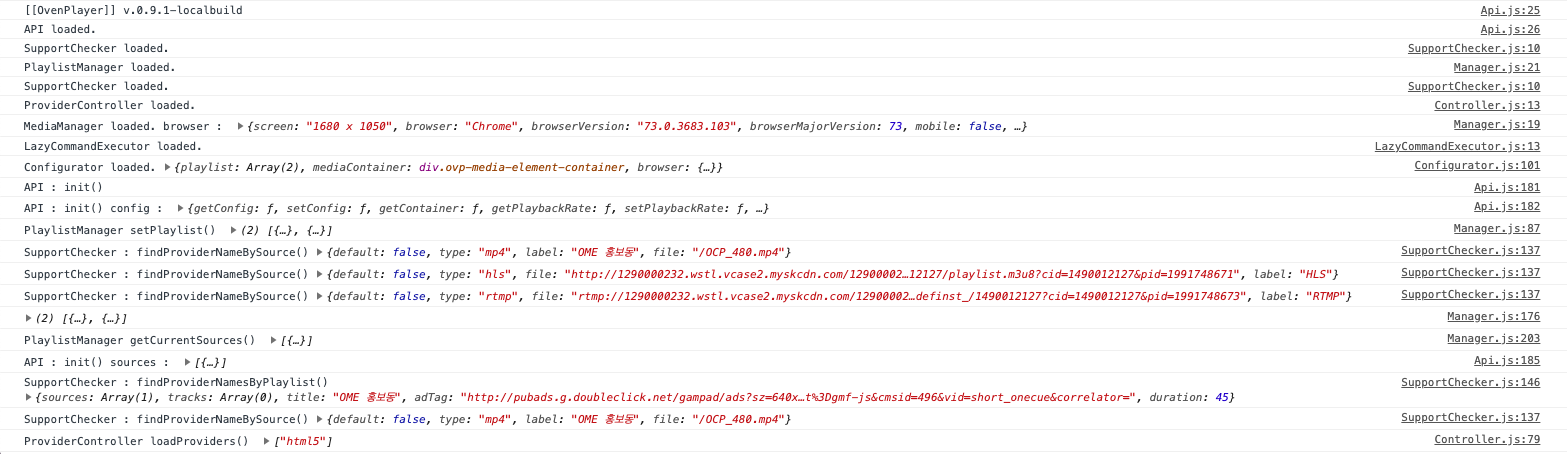
You set up to show all logs that occur in the OvenPlayer that is on the web page.
OvenPlayer.debug(true);
Options
You can use the following options to initialize the player:
aspectRatio
You can set the aspect ratio of the player to match the aspect ratio of the video playing. Any aspect ratio can be set such as "21: 9", "4: 3", "1: 1".
| Type | Default | Required |
|---|---|---|
| String | '16:9' | false |
title
You can display a title.
| Type | Default | Required |
|---|---|---|
| String | null | false |
waterMark
You can set the watermark image on the player. See the following for detailed settings.
Using watermark Image
// watermark example
var player = OvenPlayer.create("player", {
    waterMark: {
        image: '/path/to/watermark/image.png',
        position: 'top-left',
        y: '20px',
        x: '20px',
        width: '40px',
        height: '30px',
        opacity: 0.7
    },
    sources: [...]
});
waterMark.image
Sets the URL of the watermark image.
| Type | Default | Required |
|---|---|---|
| String | null | true |
Using watermark text
// watermark example
var player = OvenPlayer.create("player", {
    waterMark: {
        text: 'Text for water mark',
        font: {
            'font-size': '20px',
            'color': '#fff',
            'font-weight': 'bold'
        }
        position: 'bottom-right'
    },
    sources: [...]
});
waterMark.text
Sets the text of the watermark.
| Type | Default | Required |
|---|---|---|
| String | null | true |
waterMark.font
Sets the font style of the watermark text. All Font CSS key-value available (e.g. font-size, font-weight, color...)
| Type | Default | Required |
|---|---|---|
| Object | null | false |
Watermark common settings
waterMark.position
Sets the location where the watermark is placed. top-right, top-left, bottom-right, bottom-left are available.
| Type | Default | Required |
|---|---|---|
| String | 'top-right' | false |
waterMark.y
Sets the distance from the top or bottom specified by waterMark.position. All CSS value available (e.g. 10px, 5%, 1rem...)
| Type | Default | Required |
|---|---|---|
| String | 5% | false |
waterMark.x
Sets the distance from the left or right specified by waterMark.position. All CSS value available (e.g. 10px, 5%, 1rem...)
| Type | Default | Required |
|---|---|---|
| String | 2.8% | false |
waterMark.width
Sets the width of the watermark image. The default value auto means set to the original width of the image. All CSS value available (e.g. 10px, 5%, 1rem...)
| Type | Default | Required |
|---|---|---|
| String | auto | false |
waterMark.height
Sets the height of the watermark image. The default value auto means set to the original height of the image. All CSS value available (e.g. 10px, 5%, 1rem...)
| Type | Default | Required |
|---|---|---|
| String | auto | false |
waterMark.opacity
Sets the URL of the watermark image.
| Type | Default | Required |
|---|---|---|
| Number | 0.7 | false |
autoStart
| Type | Default | Required |
|---|---|---|
| boolean | false | false |
You can choose whether to play OvenPlayer automatically when the source is loaded. However, depending on the Browser Policy, it may restrict autoplay at any time.
autoFallback
| Type | Default | Required |
| boolean | True | false |
If set to true, if playback fails when multiple playback sources are set, the playback source set to the next will be played automatically.
controls
| Type | Default | Required |
|---|---|---|
| boolean | true | false |
If you don't want to show the control bar on OvenPlayer, change this option to false.
loop
| Type | Default | Required |
|---|---|---|
| boolean | false | false |
You can play a video repeatedly using this option.
showBigPlayButton
| Type | Default | Required |
|---|---|---|
| boolean | true | false |
You can choose whether to show or hide the big play button.
disableSeekUI
| Type | Default | Required |
|---|---|---|
| boolean | false | false |
You can disable users to seek using a progress bar or keyboard interaction.
showSeekControl
| Type | Default | Required |
|---|---|---|
| boolean | false | false |
You can choose whether to show or hide the quick seek buttons.
seekControlInterval
| pe | Default | Required |
|---|---|---|
| Number | 10 | false |
You can set seek interval of the quickly seek button.
expandFullScreenUI
| pe | Default | Required |
|---|---|---|
| boolean | false | false |
You can enable users to enter or exit the full screen with double click the player.
iOSFakeFullScreen
| pe | Default | Required |
|---|---|---|
| boolean | false | false |
You can use fake full screen ui (Make player full size on screen) on iOS.
mute
| Type | Default | Required |
|---|---|---|
| boolean | false | false |
If you set this option to true, it will run in mute mode.
timecode
| Type | Default | Required |
|---|---|---|
| boolean | true | false |
You set whether to display time or frame information in the control bar on OvenPlayer. If framerate is not provide to source this option will always be true.
playbackRate
| Type | Default | Required |
|---|---|---|
| Number | 1 | false |
You can set the playback speed with this option.
playbackRates
| Type | Default | Required |
|---|---|---|
| Array of Number | [2, 1.5, 1, 0.5, 0.25] | false |
You can set the range of video playback speed. The playback speed range is 0.25 to 4x.
currentProtocolOnly
| Type | Default | Required |
|---|---|---|
| Boolean | false | false |
It shows only current protocols. (*If you want to show only quality information when there are various protocols and various quality information together, please use it.)
sources
If you have multiple protocols or multiple resolutions for a single content, you can register them at once using sources. Also, multiple protocols can support a broader range of browsers, and multiple resolutions allow viewers to select video quality.
OvenPlayer will play a video in the order of the protocol or resolution you entered in sources and will automatically play the next source if playback fails.
If a label is set, it will be displayed in the player source selection UI. The framerate setting only works on VOD and is required to display the time in frames in the progress bar.
let player = OvenPlayer.create("player", {sources : [
    {
        type : "webrtc",
        file : "wss://demo.ovenmediaengine.com/app/stream",
        label: "WebRTC Stream", // optional
        framerate: 60 // optional
    },
    {
        type : "hls",
        file : "wss://demo.ovenmediaengine.com/app/stream/playlist.m3u8",
        label: "HLS Stream", // optional
        framerate: 60 // optional
    }
] });
tracks
| Type | Default | Required |
|---|---|---|
| Array of Object | - | false |
You can register the URL information of the subtitle file shown with a video. OvenPlayer supports *.vtt, *.srt, and *.smi as subtitle file formats.
let player = OvenPlayer.create("player", {sources : {
        type : "mp4",
        file :  "https://path.to/your_video",
        label : "360P"
    ],
    tracks : [
        {
            kind : "captions",
            file :  "https://path.to/your_caption.vtt",
            label : "KO vtt"
        },
        {
            kind : "captions",
            file :  "https://path.to/your_caption.srt",
            label : "KO srt"
        },
        {
            kind : "captions",
            file :  "https://path.to/your_caption.smi",
            label : "KO smi"
        }
    ]
});
section
You can cut the playback before the time of sectionStart and cuts the playback after the time of sectionEnd. The example below will only play between 300 seconds to 600 seconds of the stream.
sources: [
    {
        type: 'hls',
        file: 'https://test-streams.mux.dev/x36xhzz/x36xhzz.m3u8',
        sectionStart: 300,
        sectionEnd: 600,
    }
]
overrideNative
You can prevent the use of some browser's native HLS capabilities by setting the flag
overrideNative to the video source. This forces the use of Media Source Extensions
to provide a more consistent experience between browsers.
sources: [
    {
        type: 'hls',
        file: 'https://test-streams.mux.dev/x36xhzz/x36xhzz.m3u8',
        overrideNative: true,
    }
]
volume
| Type | Default | Required |
|---|---|---|
| Number | 100 | false |
You can set the initial volume when a user plays a video in OvenPlayer.
adTagUrl
| Type | Default | Required |
|---|---|---|
| String | - | false |
You can set the URL of the Video Ad Serving Template (VAST) to play in OvenPlayer. Also, OvenPlayer supports VAST 4, VAST 3, VAST 2, VPAID 2 (HTML 5), and VMAP 1.0.1.
For more information, see Support and Compatibility.
let player = OvenPlayer.create("player", {
    adTagUrl : "https://pubads.g.doubleclick.net/gampad/ads?...",
    sources : {
        type : "mp4",
        file :  "https://path.to/your_video",
        label : "360P"
    ]
});
adClient
| Type | Default | Required |
|---|---|---|
| String | "googleima" | false |
Sets whether to Google IMA or Simple VAST the Ads client when player initialize. "googleima" or "vast".
image
| Type | Default | Required |
|---|---|---|
| String | - | false |
You can set the URL of a poster image / thumbnail. The image file is displayed prior to the player showing the first frames of the video.
playlist
| Type | Default | Required |
|---|---|---|
| Array of Object | - | false |
| Field | Type | Default | Required |
|---|---|---|---|
| title | String | sources[0].label | false |
| image | String | - | false |
| duration | Number | - | false |
| adTagUrl | String | - | false |
| sources | Object | Array of Object | - | true |
| tracks | Array of Object | - | false |
playlist has multiple sources mentioned above. You can explore between playlists, and it automatically plays the next content. Also, you can assign ads and captions for each playlist.
let player = OvenPlayer.create("player", {
    playlist : [
        {
            title : "01",
            adTagUrl : "https://pubads.g.doubleclick.net/gampad/ads?...",
            image : "https://path.to/your_video_thumbnail.jpeg",
            duration : 7343,
            sources: [
                {
                    type : "mp4",
                    file :  "https://path.to/your_video",
                    label : "360P"
                }
            ],
            tracks: [
                {
                    kind : "captions",
                    file :  "https://path.to/your_caption.vtt",
                    label : "KO vtt"
                }
            ]
        },
        {
            title : "02",
            adTagUrl : "https://pubads.g.doubleclick.net/gampad/ads?...",
            image : "https://path.to/your_video_thumbnail2.jpeg",
            duration : 8333,
            sources: [
                {
                    type : "mp4",
                    file :  "https://path.to/your_video2",
                    label : "360P"
                },
                {
                    type : "mpd",
                    file :  "https://path.to/your_video.mpd",
                    label: "360P DASH"
                }
            ],
            tracks: [
                {
                    kind : "captions",
                    file :  "https://path.to/your_caption2.vtt",
                    label : "KO vtt"
                }
            ]
        }
    ]
});
hidePlaylistIcon
| Type | Default | Required |
|---|---|---|
| boolean | false | false |
You can set whether to show or hide the playlist button when the playlist is initialized.
webrtcConfig
When playing WebRTC, you can set WebRTC specific configurations.
webrtcConfig.timeoutMaxRetry & webrtcConfig.connectionTimeout
| Type | Default | Required | |
timeoutMaxRetry | Number | 0 | false |
connectionTimeout | Number | 10000 | false |
Set the timeout from the start of signaling until it is connected with OvenMediaEngine. connectionTimeout sets the maximum allowable time until a connection is established. timeoutMaxRetry sets the number of times the player will automatically retry the connection when the maximum allowed time has elapsed. When retrying a connection due to a timeout, the player does not display an error message. If the connection fails after retries for timeoutMaxRetry, the player throws a timeout error. If timeoutMaxRetry is set to 0, no timeout processing is performed.
webrtcConfig.playoutDelayHint
| Type | Default | Required |
|---|---|---|
| Number | null | false |
Set the play out delay hint for WebRTC playback. If the browser supports it, the initial playback will be delayed by the set value.
webrtcConfig.iceServers
| Type | Default | Required |
|---|---|---|
| Object | null | false |
You can set a list of STUN or TURN servers.
let player = OvenPlayer.create("player", {
    sources : [
        {
            type : "webrtc",
            file : "ws://source"
        }
    ],
    webrtcConfig: {
        iceServers: [
            {
                "urls": [
                    "stun:64.233.189.127:19302",
                    "stun:[2404:6800:4008:c07::7f]:19302"
                ]
            },
            {
                "urls": [
                    "turn:108.177.125.127:19305?transport=udp",
                    "turn:[2404:6800:4008:c01::7f]:19305?transport=udp",
                    "turn:108.177.125.127:19305?transport=tcp",
                    "turn:[2404:6800:4008:c01::7f]:19305?transport=tcp"
                ],
                "username": "username",
                "credential": "credential"
            }
        ]
    }
);
webrtcConfig.iceTransportPolicy
| Type | Default | Required |
|---|---|---|
| Object | null | false |
You can ice transport policy, which can limit the transport policies of the ICE candidates to be considered during the connection process.
| iceTransportPolicy | Description |
|---|---|
| "all" | All ICE candidates will be considered. |
| "public" | Only ICE candidates with public IP addresses will be considered. Removed from the specification's May 13, 2016 working draft. |
"relay" | Only ICE candidates whose IP addresses are being relayed, such as those passed through a TURN server, will be considered. |
let player = OvenPlayer.create("player", {
    sources : [
        {
            type : "webrtc",
            file : "ws://source"
        }
    ],
    webrtcConfig: {
        iceTransportPolicy: "all"
    }
);
hlsConfig
When playing HLS, you can set hls.js detailed tuning options (https://github.com/video-dev/hls.js/blob/master/docs/API.md#fine-tuning).
| Type | Default | Required |
|---|---|---|
| Object | null | false |
dashConfig
When playing DASH, you can set configuration(https://cdn.dashjs.org/latest/jsdoc/module-Settings.html) parameters of Dash.js MediaPlayer.
| Type | Default | Required |
|---|---|---|
| Object | null | false |