TranscodeWebhook
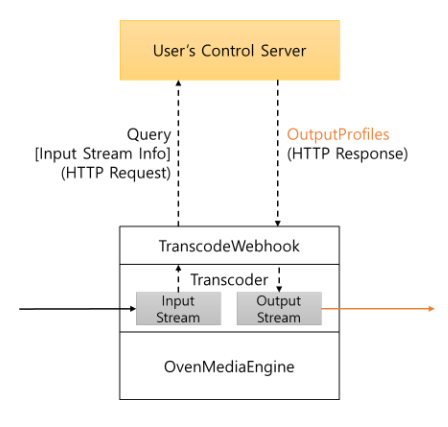
TranscodeWebhook allows OvenMediaEngine to use OutputProfiles from the Control Server's response instead of the OutputProfiles in the local configuration (Server.xml). OvenMediaEngine requests OutputProfiles from the Control Server when streams are created, enabling the specification of different profiles for each individual stream.
Configuration
<Applications>
	<Application>
		<Name>app</Name>
		<!-- Application type (live/vod) -->
		<Type>live</Type>

		<TranscodeWebhook>
			<Enable>true</Enable>
			<ControlServerUrl>http://example.com/webhook</ControlServerUrl>
			<SecretKey>abc123!@#</SecretKey>
			<Timeout>1500</Timeout>
			<UseLocalProfilesOnConnectionFailure>true</UseLocalProfilesOnConnectionFailure>
			<UseLocalProfilesOnServerDisallow>false</UseLocalProfilesOnServerDisallow>
			<UseLocalProfilesOnErrorResponse>false</UseLocalProfilesOnErrorResponse>
		</TranscodeWebhook>
Enable (required)
You can enable or disable TranscodeWebhook settings.
ControlServerUrl (required)
It's the URL of the Control Server, and it supports both HTTP and HTTPS.
SecretKey (optional)
This is the Secret Key used to pass authentication for the Control Server. To pass security authentication, an HMAC-SHA1 encrypted value of the HTTP Payload is added to the HTTP Header's X-OME-Signature. This Key is used for generating this value.
Timeout (optional, default: 1500)
This is the Timeout value used when connecting to the Control Server.
UseLocalProfilesOnConnectionFailure(optional, default: true)
This determines whether to use the OutputProfiles from Local settings in case of communication failure with the Control Server. If it's set to "false," a communication failure with the Control Server will result in a failure to create the Output stream.
UseLocalProfilesOnServerDisallow (optional, default: false)
When the Control Server responds with a 200 OK, but "allowed" is set to "false," this policy is followed.
UseLocalProfilesOnErrorResponse (optional, default: false)
When the Control Server responds with error status codes such as 400 Bad Request, 404 Not Found, 500 Internal Error, OvenMediaEngine follows this policy.
Protocol
Request (OME → Control Server)
OvenMediaEngine sends requests to the Control Server in the following format.
POST /configured/target/url/ HTTP/1.1
Content-Length: 1482
Content-Type: application/json
Accept: application/json
X-OME-Signature: f871jd991jj1929jsjd91pqa0amm1
{
  "source": "TCP://192.168.0.220:2216",
  "stream": {
    "name": "stream",
    "virtualHost": "default",
    "application": "app",
    "sourceType": "Rtmp",
    "sourceUrl": "TCP://192.168.0.220:2216",
    "createdTime": "2025-06-05T14:43:54.001+09:00",
    "tracks": [
      {
        "id": 0,
        "name": "Video",
        "type": "Video",
        "video": {
          "bitrate": 10000000,
          "bitrateAvg": 0,
          "bitrateConf": 10000000,
          "bitrateLatest": 21845,
          "bypass": false,
          "codec": "H264",
          "deltaFramesSinceLastKeyFrame": 0,
          "framerate": 30.0,
          "framerateAvg": 0.0,
          "framerateConf": 30.0,
          "framerateLatest": 0.0,
          "hasBframes": false,
          "width": 1280,
          "height": 720,
          "keyFrameInterval": 1.0,
          "keyFrameIntervalAvg": 1.0,
          "keyFrameIntervalConf": 0.0,
          "keyFrameIntervalLatest": 0.0
        }
      },
      {
        "id": 1,
        "name": "Audio",
        "type": "Audio",
        "audio": {
          "bitrate": 160000,
          "bitrateAvg": 0,
          "bitrateConf": 160000,
          "bitrateLatest": 21845,
          "bypass": false,
          "channel": 2,
          "codec": "AAC",
          "samplerate": 48000
        }
      },
      {
        "id": 2,
        "name": "Data",
        "type": "Data"
      }
    ]
  }
}
Response (Control Server → OME)
The Control Server responds in the following format to specify OutputProfiles for the respective stream.
HTTP/1.1 200 OK
Content-Length: 886
Content-Type: application/json
Connection: Closed
{
  "allowed": true,
  "reason": "it will be output to the log file when `allowed` is false",
  "outputProfiles": {
    "outputProfile": [
      {
        "name": "bypass",
        "outputStreamName": "${OriginStreamName}",
        "encodes": {
          "videos": [
            {
              "name": "bypass_video",
              "bypass": "true"
            }
          ],
          "audios": [
            {
              "name": "bypass_audio",
              "bypass": true
            }
          ]
        },
        "playlists": [
          {
            "fileName": "default",
            "name": "default",
            "renditions": [
              {
                "name": "bypass",
                "video": "bypass_video",
                "audio": "bypass_audio"
              }
            ]
          }
        ]
      }
    ]
  }
}
The outputProfiles section in the JSON structure mirrors the configuration in Server.xml and allows for detailed settings as shown below:
"outputProfiles": {
  "hwaccels": {
    "decoder": {
      "enable": false
    },
    "encoder": {
      "enable": false
    }
  },
  "decodes": {
    "threadCount": 2,
    "onlyKeyframes": false
  },
  "outputProfile": [
    {
      "name": "bypass",
      "outputStreamName": "${OriginStreamName}",
      "encodes": {
        "videos": [
          {
            "name": "bypass_video",
            "bypass": "true"
          },
          {
            "name": "video_h264_1080p",
            "codec": "h264",
            "width": 1920,
            "height": 1080,
            "bitrate": 5024000,
            "framerate": 30,
            "keyFrameInterval": 60,
            "bFrames": 0,
            "preset": "faster"
          },
          {
            "name": "video_h264_720p",
            "codec": "h264",
            "width": 1280,
            "height": 720,
            "bitrate": 2024000,
            "framerate": 30,
            "keyFrameInterval": 60,
            "bFrames": 0,
            "preset": "faster"
          }
        ],
        "audios": [
          {
            "name": "aac_audio",
            "codec": "aac",
            "bitrate": 128000,
            "samplerate": 48000,
            "channel": 2,
            "bypassIfMatch": {
              "codec": "eq"
            }
          },
          {
            "name": "opus_audio",
            "codec": "opus",
            "bitrate": 128000,
            "samplerate": 48000,
            "channel": 2,
            "bypassIfMatch": {
              "codec": "eq"
            }
          }
        ],
        "images": [
          {
            "codec": "jpeg",
            "framerate": 1,
            "width": 320,
            "height": 180
          }
        ]
      },
      "playlists": [
        {
          "fileName": "abr",
          "name": "abr",
          "options": {
            "enableTsPackaging": true,
            "webRtcAutoAbr": true,
            "hlsChunklistPathDepth": -1
          },
          "renditions": [
            {
              "name": "1080p_aac",
              "video": "video_h264_1080p",
              "audio": "aac_audio"
            },
            {
              "name": "720p_aac",
              "video": "video_h264_720p",
              "audio": "aac_audio"
            },
            {
              "name": "1080p_opus",
              "video": "video_h264_1080p",
              "audio": "opus_audio"
            },
            {
              "name": "720p_opus",
              "video": "video_h264_720p",
              "audio": "opus_audio"
            }
          ]
        }
      ]
    }
  ]
}
tracksets (optional)
Each entry in outputProfile may contain a tracksets array. A TrackSet is a named subset of the profile's encodes that the OVT publisher exposes on a dedicated pull URL (ovt://host:port/app/stream/trackset_name), so an Edge can pull only a portion of the stream. See TrackSet (selective track delivery over OVT) for the full feature description.
The JSON shape mirrors the <TrackSet> element in Server.xml:
| Field | Type | Required | Default | Description |
|---|---|---|---|---|
name | string | yes | TrackSet name. Used as the trailing path segment of the OVT pull URL. | |
strict | boolean | no | false | When true, a videos or audios entry that references a non-existent encode fails output stream creation. When false, the entry is warned and skipped. |
videos | array of objects | no | Video encode references to include in this TrackSet. At least one of videos or audios must be set. | |
audios | array of objects | no | Audio encode references to include in this TrackSet. At least one of videos or audios must be set. | |
videos[].name | string | yes | Name of a video encode declared in the same profile's encodes.videos. | |
videos[].indexHint | integer | no | Optional GroupIndex of the source encode's output track, used to disambiguate multi-track encodes. | |
audios[].name | string | yes | Name of an audio encode declared in the same profile's encodes.audios. | |
audios[].indexHint | integer | no | Optional GroupIndex of the source encode's output track (for example, to select a single language). |
Example response with tracksets populated:
{
  "allowed": true,
  "outputProfiles": {
    "outputProfile": [
      {
        "name": "default",
        "outputStreamName": "${OriginStreamName}",
        "encodes": {
          "videos": [
            { "name": "bypass_video", "bypass": true }
          ],
          "audios": [
            { "name": "aac_audio", "codec": "aac", "bitrate": 128000, "samplerate": 48000, "channel": 2 }
          ]
        },
        "playlists": [
          {
            "fileName": "default",
            "name": "default",
            "renditions": [
              { "name": "bypass", "video": "bypass_video", "audio": "aac_audio" }
            ]
          }
        ],
        "tracksets": [
          {
            "name": "edge_video_only",
            "videos": [ { "name": "bypass_video" } ],
            "audios": []
          },
          {
            "name": "edge_korean_audio",
            "videos": [ { "name": "bypass_video" } ],
            "audios": [ { "name": "aac_audio", "indexHint": 1 } ]
          }
        ]
      }
    ]
  }
}
The tracksets field is fully backward compatible. Existing Control Servers that do not return the field, or that return an empty array, produce exactly the same OutputProfile behavior as before this feature was introduced.