WebRTC / WHIP
OvenMediaEngine supports WebRTC ingest from web browsers and any encoder that implements WebRTC. Both the self-defined signaling protocol and WHIP are supported.
| Container | RTP / RTCP |
| Security | DTLS, SRTP |
| Transport | ICE |
| Error Correction | NACK + RTX (RFC 4585 / RFC 4588), ULPFEC (VP8, H.264), In-band FEC (Opus) |
| Codec | VP8, H.264, H.265, Opus |
| Signaling | Self-Defined Protocol (WebSocket), WHIP (HTTP) |
| Additional Features | Simulcast |
Configuration
Bind
<!-- /Server/Bind/Providers/WebRTC -->
<WebRTC>
    <Signalling>
        <Port>3333</Port>
        <TLSPort>3334</TLSPort>
    </Signalling>
    <IceCandidates>
        <!-- UDP ICE scales by port count: each port is handled by one thread. Use a range (~4) to spread across cores. -->
        <IceCandidate>${PublicIP}:10000-10003/udp</IceCandidate> <!-- 4 UDP ports = 4 receive threads per advertised IP -->
        <IceCandidate>${PublicIP}:3479/tcp</IceCandidate>  <!-- Direct TCP ICE (RFC 6544) -->
        <TcpRelay>${PublicIP}:3478</TcpRelay>              <!-- TURN relay -->
        <TcpRelayForce>false</TcpRelayForce>
        <TcpIceWorkerCount>1</TcpIceWorkerCount>
        <TcpRelayWorkerCount>1</TcpRelayWorkerCount>
        <DefaultTransport>udptcp</DefaultTransport>
    </IceCandidates>
</WebRTC>
<Signalling>/<Port> sets the unsecured WebSocket port. <TLSPort> sets the TLS-encrypted port.
ICE Candidates
OvenMediaEngine supports three transport types for WebRTC ingest:
| Type | Configuration | Description |
|---|---|---|
| UDP | <IceCandidate>IP:port/udp</IceCandidate> | Standard UDP, lowest latency, preferred by browsers |
| Direct TCP ICE | <IceCandidate>IP:port/tcp</IceCandidate> | Direct TCP connection to OME (RFC 6544, passive mode) |
| TURN relay | <TcpRelay>IP:port</TcpRelay> | OME's embedded TURN server, works through strict firewalls |
Use ${PublicIP} to have OME auto-resolve the public IP via <StunServer> at startup. For more information on <TcpRelay> URL format, see WebRTC over TCP.
Do not use * for ICE candidate IP in production.
* causes OME to advertise every network interface (including Docker bridge interfaces 172.17.x.x, VPN adapters, and internal NICs) as ICE candidates. Encoders will attempt connectivity checks against all of them, which significantly increases ICE negotiation time and can cause connection delays or failures.
Always specify the exact IP the encoder can reach:
- Specific IP:
<IceCandidate>203.0.113.1:10000-10003/udp</IceCandidate> - Auto-detected via STUN:
<IceCandidate>${PublicIP}:10000-10003/udp</IceCandidate>(requires<StunServer>inServer.xml)
Worker Threads
OvenMediaEngine handles each transport type independently, but they scale across CPU cores differently:
| Configuration | Default | Scaling |
|---|---|---|
<TcpIceWorkerCount> | 1 | Direct TCP ICE (RFC 6544). Connections on one port are distributed across this many threads. |
<TcpRelayWorkerCount> | 1 | TURN relay. Connections on one port are distributed across this many threads. |
UDP ICE scales by the number of ports. Each UDP port binds one socket per advertised IP, each serviced by a single thread, so a single UDP port is handled by one thread. To spread UDP ICE across CPU cores, advertise a range of UDP ports. Around 4 is a good starting point on a multi-core server:
<IceCandidate>${PublicIP}:10000-10003/udp</IceCandidate> <!-- 4 UDP ports = 4 receive threads per advertised IP -->
Direct TCP ICE and TURN relay are connection-oriented. A single port accepts many connections that are distributed across <TcpIceWorkerCount> / <TcpRelayWorkerCount> threads, so those scale on one port without adding ports.
Default Transport
<DefaultTransport> controls which candidate types are included in the signaling response when the client does not specify a ?transport query parameter. Valid values: udp, tcp, relay, udptcp (default), all. See ?transport Parameter for the full mapping.
Application
<!-- /Server/VirtualHosts/VirtualHost/Applications/Application/Providers/WebRTC -->
<WebRTC>
    <Timeout>30000</Timeout>
    <FIRInterval>3000</FIRInterval>
    <RtcpBasedTimestamp>false</RtcpBasedTimestamp>
    <Rtx>
        <Enable>true</Enable>
        <MaxHoldMs>400</MaxHoldMs>
    </Rtx>
    <CrossDomains>
        <Url>*</Url>
    </CrossDomains>
</WebRTC>
| Parameter | Description |
|---|---|
Timeout | Maximum duration (ms) to wait for an ICE Binding request/response before terminating the session. |
FIRInterval | Interval (ms) for sending a Full Intra Request (FIR) to force IDR frame generation. Set to 0 to disable. |
RtcpBasedTimestamp | false (default): each track's RTP timestamp starts from zero independently, no waiting for RTCP SR. true: RTCP Sender Reports synchronize A/V timestamps on a common clock. Use true only when the sender reliably sends RTCP SR; otherwise stream start may be delayed up to 5 seconds. |
Rtx | NACK + RTX retransmission for video. See NACK + RTX below. |
CrossDomains | Allowed domains for signaling requests (CORS). |
NACK + RTX
When <Rtx><Enable>true</Enable></Rtx> is set, OvenMediaEngine negotiates NACK feedback (RFC 4585) and RTX retransmission (RFC 4588) for every video codec in the SDP. On packet loss the receive-side jitter buffer asks the publisher to resend missing packets, recovering most short bursts of loss without forcing a keyframe.
<Rtx>
    <Enable>true</Enable>          <!-- default: false -->
    <MaxHoldMs>400</MaxHoldMs>     <!-- default: 400 -->
</Rtx>
| Parameter | Description |
|---|---|
Enable | Turn NACK + RTX on. Disabled by default. |
MaxHoldMs | Upper bound (ms) for how long the jitter buffer waits for an incomplete frame to recover before discarding it. Acts as a latency ceiling: a larger value increases recovery success in high-RTT or lossy networks at the cost of more end-to-end delay; a smaller value keeps latency tight at the cost of more discarded frames. The actual hold window is adaptive and usually lands well below this cap. Default 400. |
Audio NACK is not negotiated. Lost audio packets are concealed by Opus' in-band FEC where available, otherwise dropped.
URL Patterns
Self-defined Signaling
WebSocket-based. Add ?direction=send to distinguish ingest from playback.
ws[s]://<Host>[:<Port>]/<App>/<Stream>?direction=send
WHIP
HTTP-based. Add ?direction=whip.
http[s]://<Host>[:<Port>]/<App>/<Stream>?direction=whip
WebRTC over TCP
OvenMediaEngine supports two independent mechanisms for WebRTC/TCP ingest:
| Mode | How it works | Configuration |
|---|---|---|
| Direct TCP ICE (RFC 6544) | Encoder connects directly to OME over TCP, no relay | <IceCandidate>IP:port/tcp</IceCandidate> |
| TURN relay (RFC 8656) | Encoder connects to OME's embedded TURN server over TCP, works through strict firewalls | <TcpRelay>IP:port</TcpRelay> |
Both modes can be active simultaneously. Use the ?transport parameter to control which candidates are included in the signaling response.
?transport Parameter
| Value | UDP candidates | Direct TCP candidates | TURN relay (iceServers) |
|---|---|---|---|
| (none) | follows <DefaultTransport> (default: udptcp) | follows <DefaultTransport> | follows <TcpRelayForce> (default: false) |
udp | ✓ | — | — |
tcp | — | ✓ | — |
relay | — | — | ✓ |
udptcp | ✓ | ✓ | — |
all | ✓ | ✓ | ✓ |
<DefaultTransport> sets the policy when ?transport is absent. Valid values: udptcp (default), udp, tcp, relay, all.
Example URLs:
ws[s]://<Host>[:<Port>]/<App>/<Stream>?direction=send&transport=tcp
http[s]://<Host>[:<Port>]/<App>/<Stream>?direction=whip&transport=all
Behavior change from previous versions
?transport=tcp previously routed traffic through the embedded TURN server. It now means Direct TCP ICE (RFC 6544), a direct TCP connection to OME without any relay.
- Previous
tcpbehavior → use?transport=relayinstead <TcpRelay>must be configured in<Bind>forrelayto work<TcpForce>has been renamed to<TcpRelayForce>. The old name is still accepted. Whentrue, TURN relay info is always included in the response regardless of?transport.
Simulcast
Simulcast allows encoders to send multiple quality layers simultaneously without server-side transcoding, reducing costs on multi-core servers.
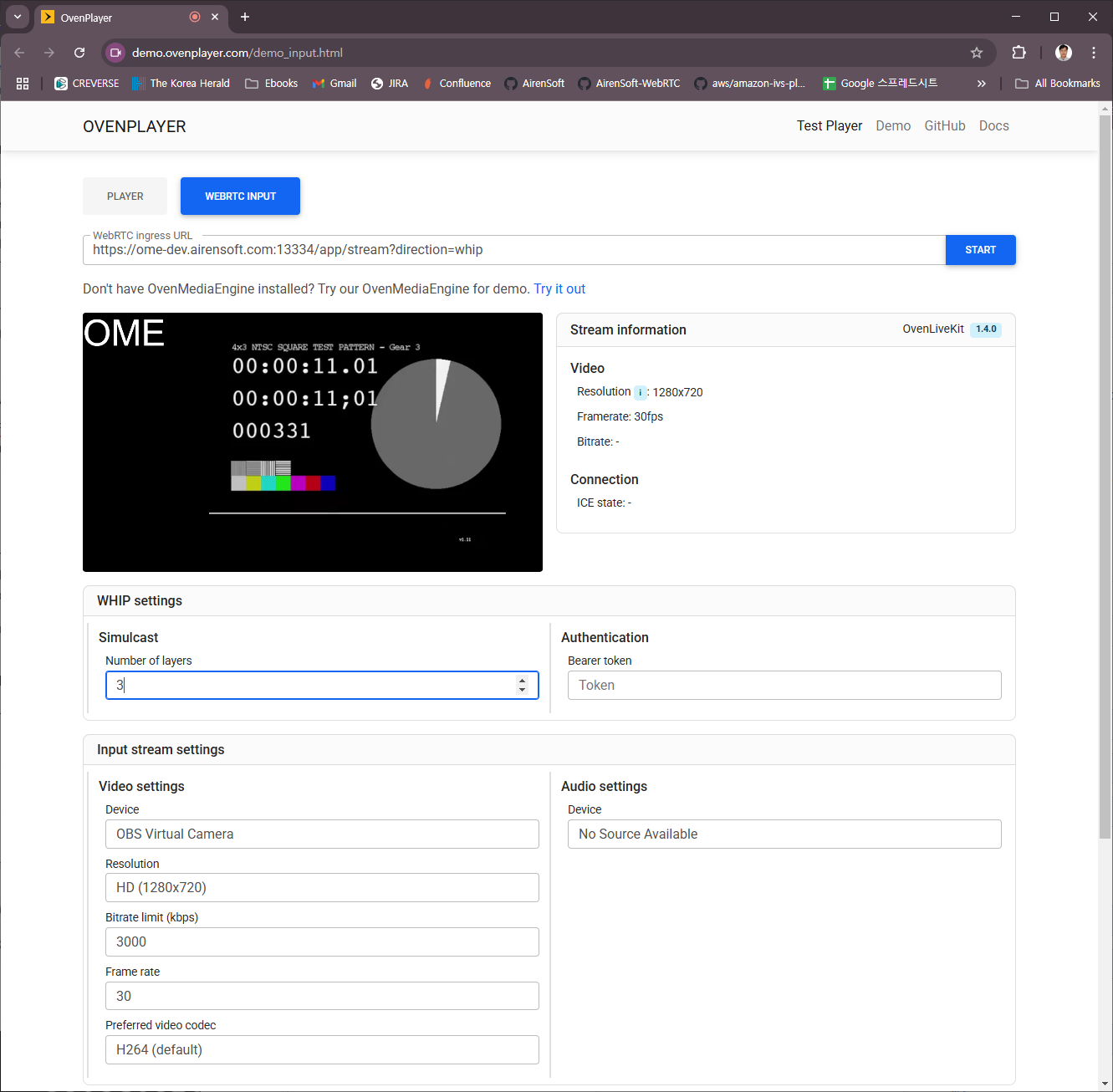
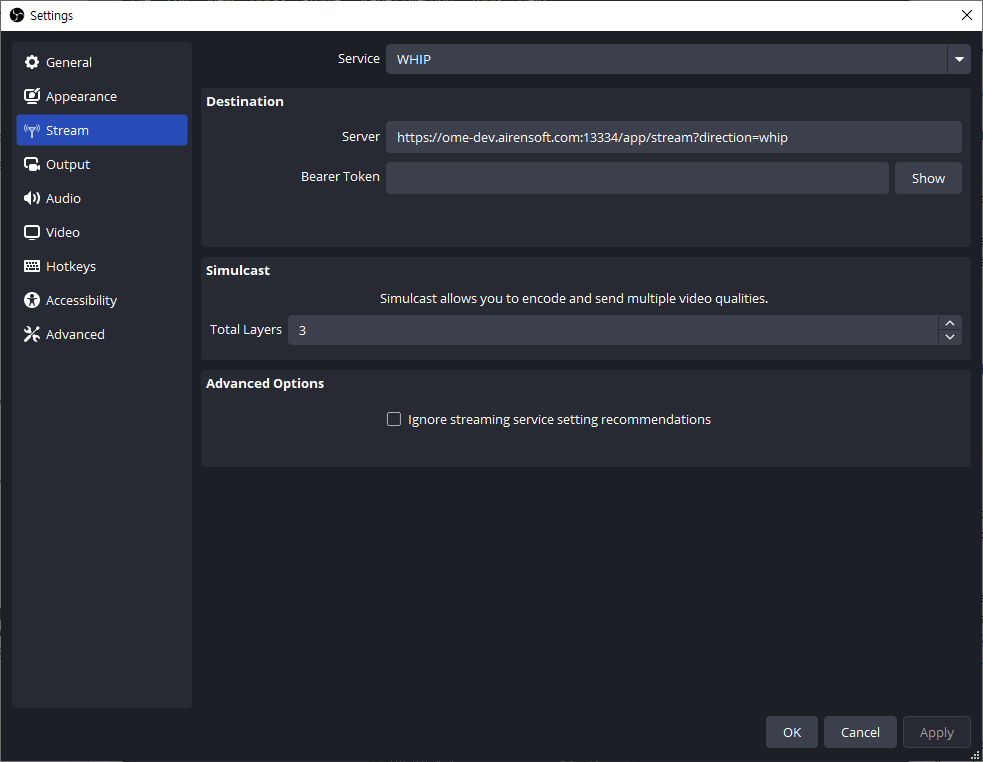
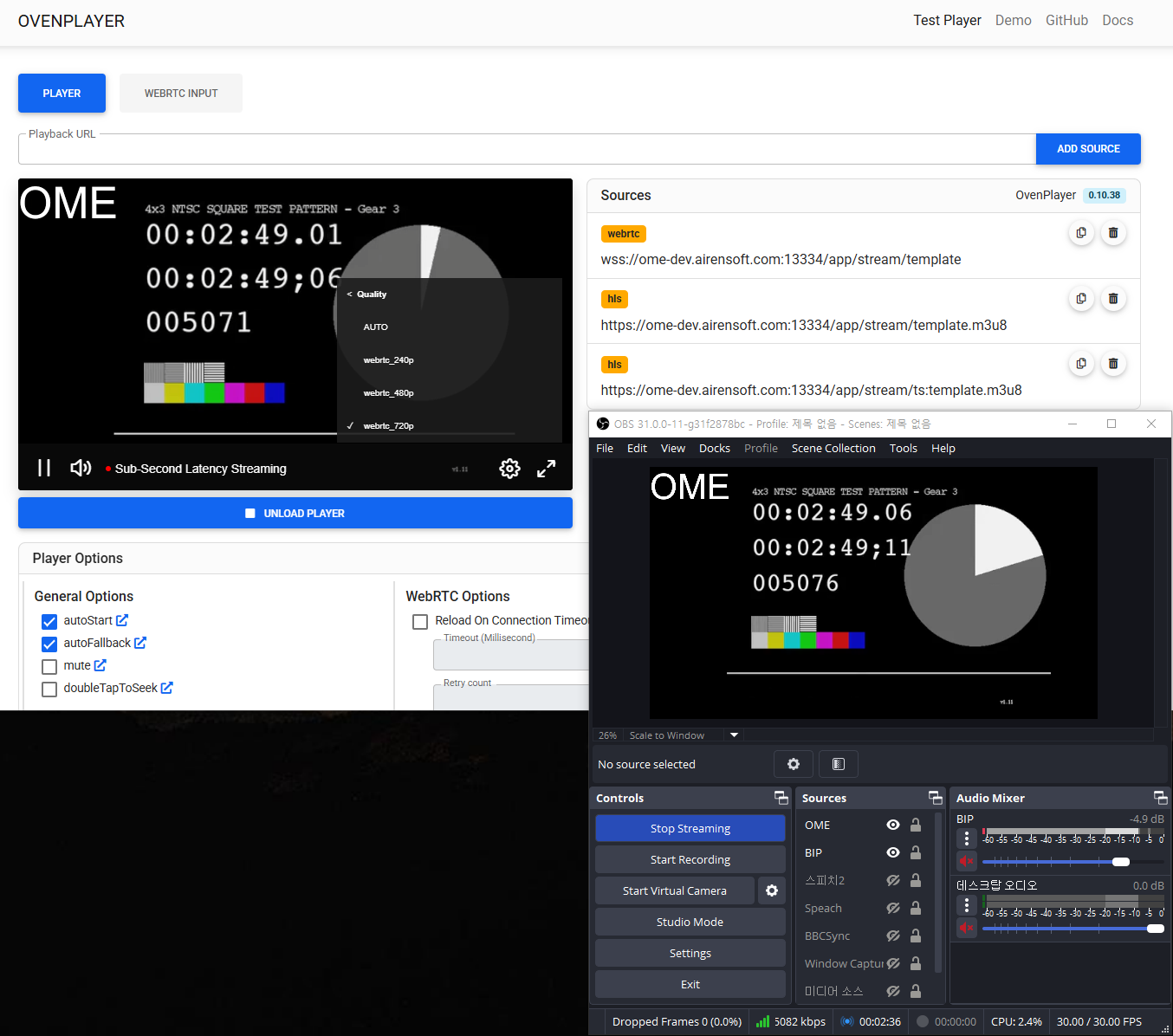
Simulcast is supported via WHIP signaling only. Test using OvenLiveKit or OBS.
Playlist Template for Simulcast
When a simulcast encoder sends N video tracks, OME creates N tracks sharing the same Variant Name. For example, with the profile below and 3 simulcast layers, OME creates 3 tracks all named video_bypass:
<!-- /Server/VirtualHosts/VirtualHost/Applications/Application -->
<OutputProfiles>
    <OutputProfile>
        <Name>stream</Name>
        <OutputStreamName>${OriginStreamName}</OutputStreamName>
        <Encodes>
            <Video>
                <Name>video_bypass</Name>
                <Bypass>true</Bypass>
            </Video>
        </Encodes>
    </OutputProfile>
</OutputProfiles>
Reference each layer by index using <VideoIndexHint> / <AudioIndexHint>:
<!-- /Server/VirtualHosts/VirtualHost/Applications/Application/OutputProfiles -->
<strong><OutputProfile>
</strong><strong>    ...
</strong>    <Playlist>
        <Name>simulcast</Name>
        <FileName>template</FileName>
        <Options>
            <WebRtcAutoAbr>true</WebRtcAutoAbr>
            <HLSChunklistPathDepth>0</HLSChunklistPathDepth>
            <EnableTsPackaging>true</EnableTsPackaging>
        </Options>
        <Rendition>
            <Name>first</Name>
            <Video>video_bypass</Video>
            <VideoIndexHint>0</VideoIndexHint> <!-- Optional, default : 0 -->
            <Audio>aac_audio</Audio>
        </Rendition>
        <Rendition>
            <Name>second</Name>
            <Video>video_bypass</Video>
            <VideoIndexHint>1</VideoIndexHint> <!-- Optional, default : 0 -->
            <Audio>aac_audio</Audio>
            <AudioIndexHint>0</AudioIndexHint> <!-- Optional, default : 0 -->
        </Rendition>
    </Playlist>
    ...
</OutputProfile>
RenditionTemplate
Manually defining a Rendition per simulcast layer requires a config change and server restart whenever the encoder adds a layer. <RenditionTemplate> auto-generates Renditions based on conditions, eliminating this need:
<!-- /Server/VirtualHosts/VirtualHost/Applications/Application/OutputProfiles -->
<OutputProfile>
    ...
    <Playlist>
        <Name>template</Name>
        <FileName>template</FileName>
        <Options>
            <WebRtcAutoAbr>true</WebRtcAutoAbr>
            <HLSChunklistPathDepth>0</HLSChunklistPathDepth>
            <EnableTsPackaging>true</EnableTsPackaging>
        </Options>
        <RenditionTemplate>
            <Name>hls_${Height}p</Name>
            <VideoTemplate>
                <EncodingType>bypassed</EncodingType>
            </VideoTemplate>
            <AudioTemplate>
                <VariantName>aac_audio</VariantName>
            </AudioTemplate>
        </RenditionTemplate>
    </Playlist>
    ...
</OutputProfile>
Available name macros: ${Width} | ${Height} | ${Bitrate} | ${Framerate} | ${Samplerate} | ${Channel}
Add conditions to filter which tracks are included:
<!-- /Server/VirtualHosts/VirtualHost/Applications/Application/OutputProfiles/OutputProfile/Playlist -->
<RenditionTemplate>
    <VideoTemplate>
        <EncodingType>bypassed</EncodingType> <!-- all | bypassed | encoded -->
        <VariantName>bypass_video</VariantName>
        <VideoIndexHint>0</VideoIndexHint>
        <MaxWidth>1080</MaxWidth>
        <MinWidth>240</MinWidth>
        <MaxHeight>720</MaxHeight>
        <MinHeight>240</MinHeight>
        <MaxFPS>30</MaxFPS>
        <MinFPS>30</MinFPS>
        <MaxBitrate>2000000</MaxBitrate>
        <MinBitrate>500000</MinBitrate>
    </VideoTemplate>
    <AudioTemplate>
        <EncodingType>encoded</EncodingType> <!-- all | bypassed | encoded -->
        <VariantName>aac_audio</VariantName>
        <MaxBitrate>128000</MaxBitrate>
        <MinBitrate>128000</MinBitrate>
        <MaxSamplerate>48000</MaxSamplerate>
        <MinSamplerate>48000</MinSamplerate>
        <MaxChannel>2</MaxChannel>
        <MinChannel>2</MinChannel>
        <AudioIndexHint>0</AudioIndexHint>
    </AudioTemplate>
    ...
</RenditionTemplate>
WebRTC Producer
A demo page is available for testing WebRTC ingest:
https://demo.ovenplayer.com/demo_input.html
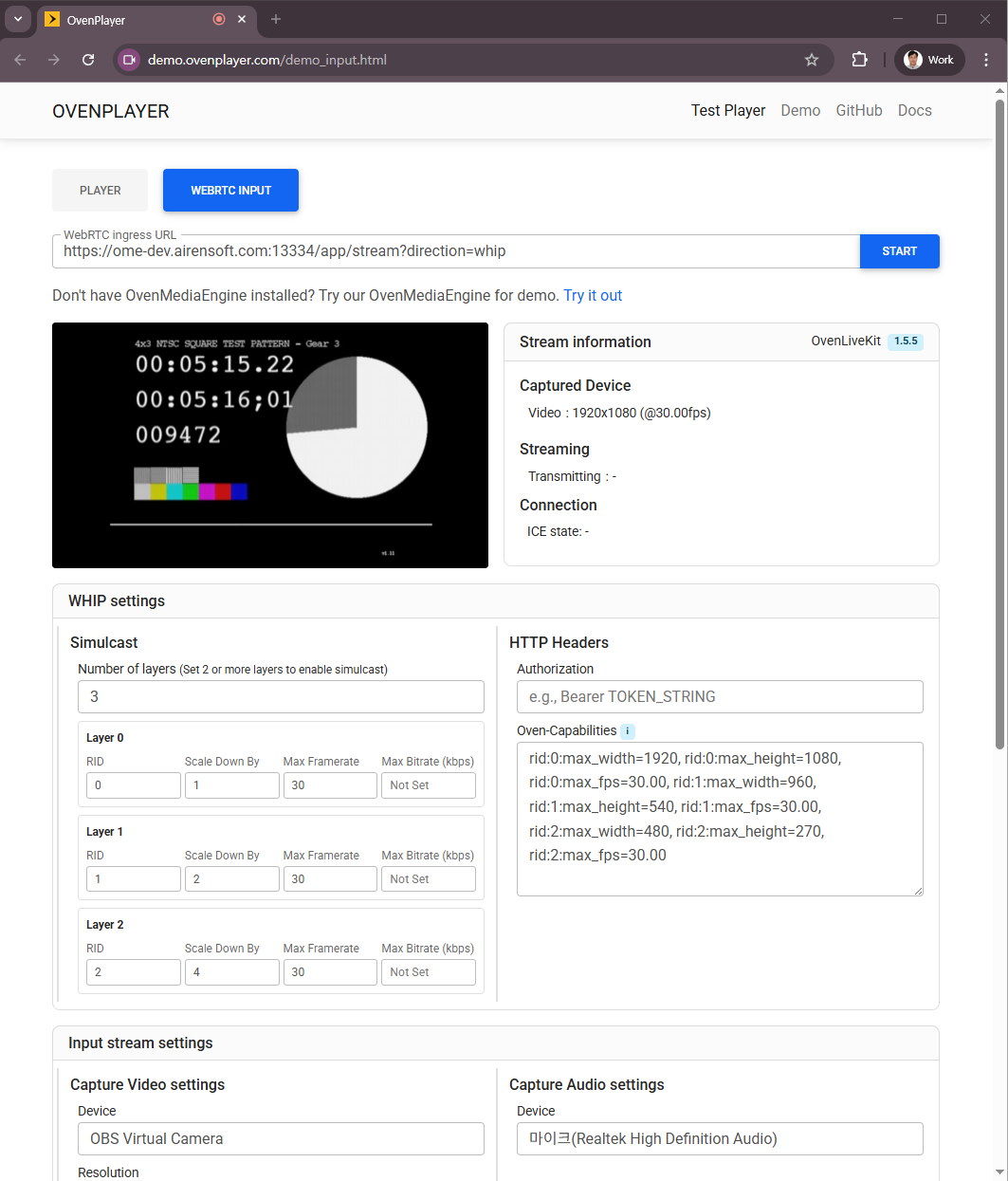
getUserMedia only works in a secure context. The demo at https://demo.ovenplayer.com/demo_input.html requires OME to serve signaling over wss. If you cannot install a TLS certificate, temporarily allow insecure content for demo.ovenplayer.com in your browser settings.
Self-defined Signaling Protocol
To build a custom WebRTC producer, implement OvenMediaEngine's Self-defined Signaling Protocol or WHIP. The self-defined protocol uses the same format as WebRTC Streaming.
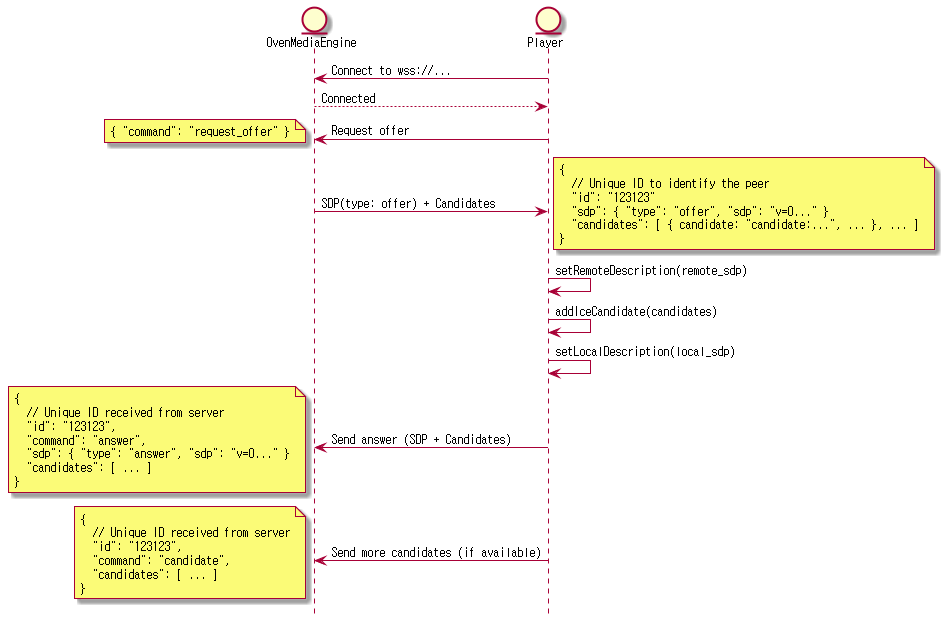
Connect to ws[s]://host:port/app/stream?direction=send via WebSocket and send a request-offer command. OME responds with an offer SDP containing all configured ICE candidates (UDP, Direct TCP if configured) and, if <TcpRelay> is set, an iceServers field with TURN server information. Pass iceServers to RTCPeerConnection, then call setRemoteDescription, addIceCandidate with the offer SDP, generate an answer SDP, and send it back to OME.