Configuration
Configuration
Event monitoring can be configured by modifying Server.xml or through the Web Console.
Configuration using Server.xml
To enable event monitoring, add the relevant settings to Server.xml.
<?xml version="1.0" encoding="UTF-8" standalone="no"?>
<Server version="8">

 <Monitoring>
    <Events>
      <Level>info</Level>
      <Log>
        <Enabled>true</Enabled>
        <Path>/var/log/ovenmediaengine</Path>
      </Log>
    </Events>
  </Monitoring>

</Server>
| Parameter | Required | Description |
|---|---|---|
<Events><Level> | N | Event logs have different levels according to operations. Configurable values are trace, debug, info, warn, error, and the default is debug. |
<Events><Log><Enabled> | Y | The event logging function can be enabled or disabled with true or false. |
<Events><Log><Path> | N | Specifies the directory where event log files are saved. The default directory is /var/log/ovenmediaengine. |
If you modify Server.xml, you need to restart OvenMediaEngine and the Web Console.
Configuration using the Web Console
You can enable the event monitoring function through the UI on the Web Console's Server Settings page.
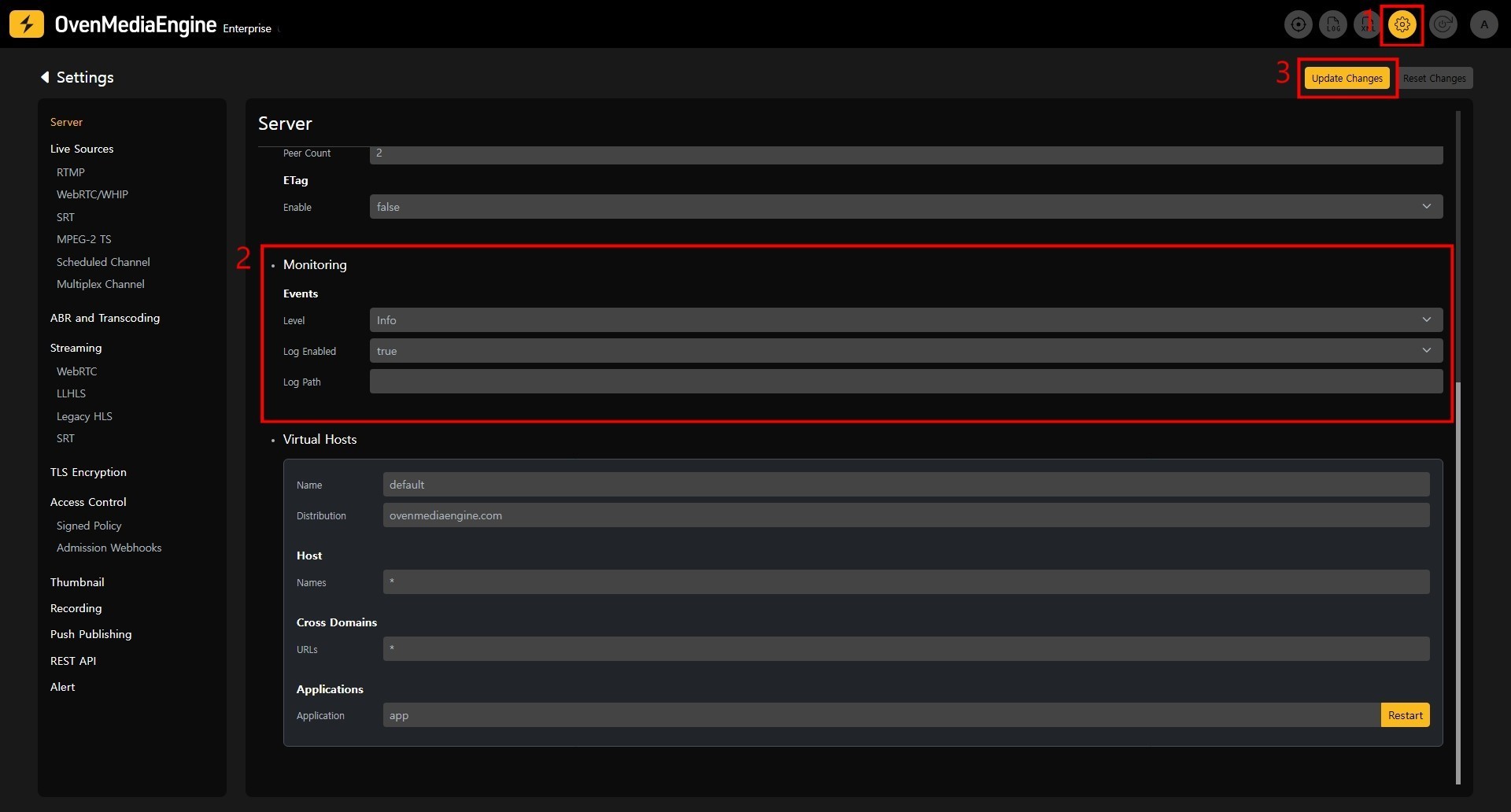
- Navigate to the Settings → Server page using the navigation at the top-right of the screen.
- Set the values in the monitoring section.
2-1.level: Set the level of event logs.
2-2.Log Enabled: Set totrueto enable event logging.
2-3.Log Path: Set the directory where event logs will be saved. If set to an empty value, event logs will be saved asevent.login OvenMediaEngine's default log storage directory,/var/log/ovenmediaengine. - After setting the values, click the
Update Changesbutton at the top to apply the changes.
OvenMediaEngine will automatically restart when changes are applied.
Post Configuration
Web Console Event Log Directory Setting
No additional settings are needed if you use the default directory, /var/log/ovenmediaengine.
To synchronize recorded event logs with the Web Console, you need to match the Web Console's environment variables with the configured LogPath.
You can set the changed event logging directory by adding environment variables to system.env.
OS_ENGINE_MONITORING_EVENT_PATH=/your/eventlog/directory
Event Specification
Please refer to the Event Specification document for details on the event formats and event lists recorded through event logging.